Vibe-Coding a Custom UI Component
Design of a customised accordion UI component for a specific use-case enabling portfolio managers within the asset management industry to view portfolios, positions, model and calibrate trades, and view its effects to the cumulative net risk, asset & liabilities, net risk as visualisations, and resulting orders.
Problem
Portfolio managers had to switch between two separate applications — Trade Calibration and Modelling Log — to view calibrated trades and resulting orders. This fragmented workflow caused excessive window switching, loss of context, and reduced efficiency.
Objective
Unify trade calibration and order review into a single, coherent workflow — without increasing cognitive load or exceeding strict screen-size constraints.
Constraints
- Fixed standard monitor resolution: 1920 × 1024
- Existing UI patterns did not support conditional multi-panel visibility
- Critical information needed to remain visible during calibration
Solution
Designed a custom three-panel layout inspired by an accordion component, but with bespoke interaction rules:
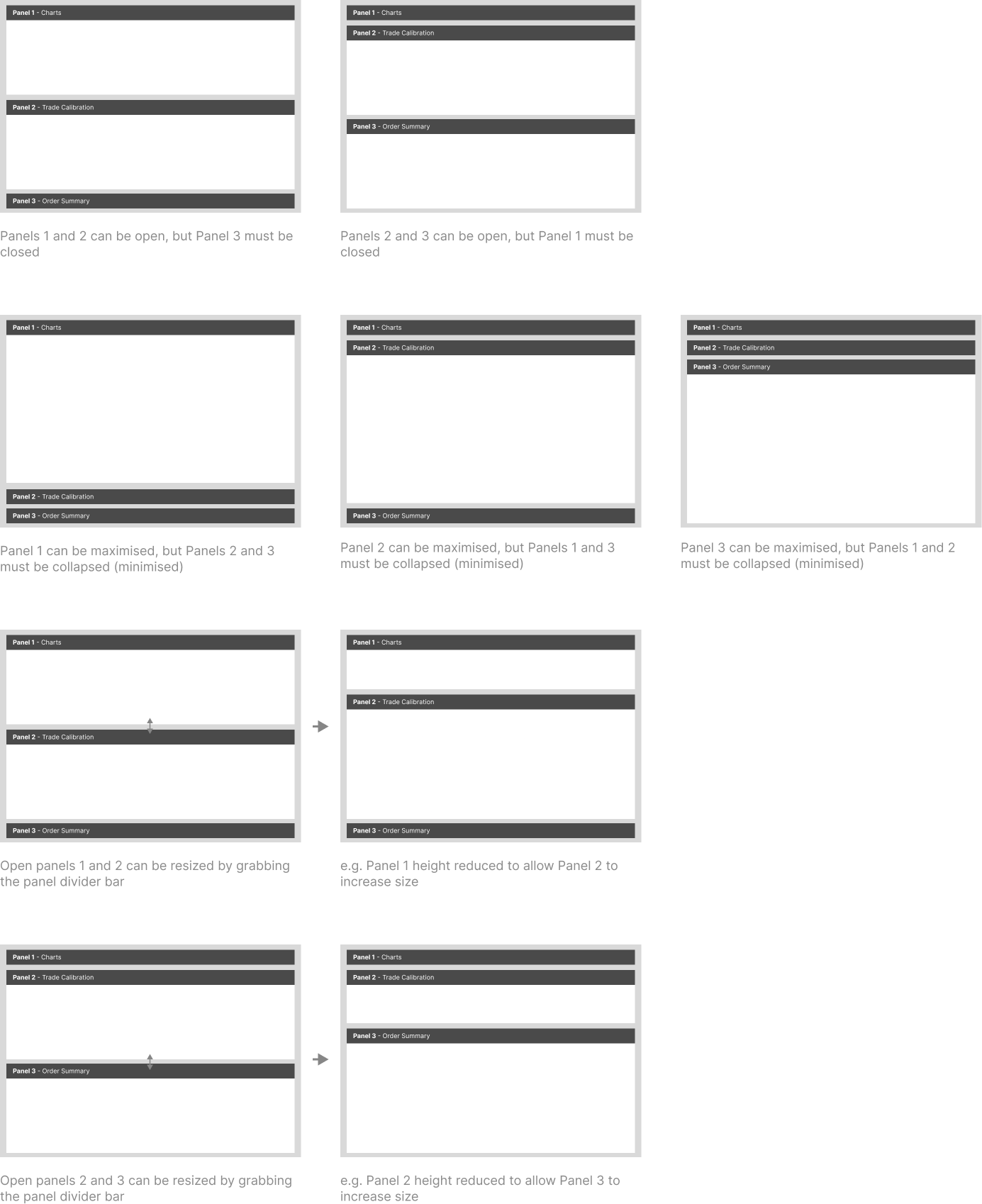
- Charts + Trade Calibration panels remain visible during calibration
- Once calibration is complete, Orders replace the Charts panel
- Trade Calibration remains visible at all times for cross-referencing
Required Panel Behaviour
Outcomes
For Product team:
-
Demonstrated how AI-assisted rapid prototyping can accelerate exploration of non-standard UI behaviour
For users:
-
Eliminated context switching between applications
-
Reduced window and tab proliferation
-
Preserved situational awareness while supporting different task phases
LLM used: ChatGPT 5.1 (24-Nov-2025)
Prompt
                    i need html, css, javascript code to create a 3 section accordion. but the behaviour is customised, so that:
at any time, either sections 1 and 2 are open and section 3 is collapsed, or if section 1 header is clicked, the section is collapsed, and section 3 expands from bottom-up, whilst section 2 remains open.
Result
Prompt
with the custom accordion, can you make the accordion a fixed height of 800px, and the accordion section automatically fill the available height?
Result
Prompt
i do not want them to be equal height. please update the code
Result
Prompt
                    html, css, javascript code for an accordion-like component with custom/specific behaviours:
                    I need 3 vertically stacked content cards/panels. each panel when all open take up about a third of the vertial screen real-estate of the parent container. This parent container may not be 100% of the vertical height, as it may sit underneath a page header.
                    I need this parent container that comprises of the 3 card/panels to take up all of the vertical space after the page header is taken into account.
                    I have specific rules for the 3 card/panels:
                    card 1 (top) and 2 (middle) can be expanded at the same time but card 3 (bottom) must be minimised, with the card header showing, the card body hidden/collapsed.
                    If card 3's header is clicked, then card 1 is collapsed, card 2 remains visible, card 3 expands to reveal the card body.
                    if card 1 is minimised / collapsed, and its header is clicked, then card 3 is minimised, and card 1's body is expanded.
                    If both card 1 and 2 are expanded/visible, then card 3 must be collapsed. if card 2 header is clicked at this point, then collapse card 2's body, and maximise card 1's body to fill up the newly available space, pushing down card 2's header down to sit just above card 3' header within the parent container.
                    if card 2' header is clicked in this minimised state, and card 1 is expanded, then revert to the previous state.
Result
Prompt
                    I forgot to complete a few more requirements, so please redo the previous instructions, BUT with these ADDITIONAL rules:
                    If both card 2 and 3 are expanded/visible, then card 1 must be collapsed. if card 2 header is clicked at this point, then collapse card 2's body, and maximise card 3's body to fill up the newly available space, pushing up card 2's header up to sit just below card 1s header within the parent container.
                    if card 2' header is clicked in this minimised state, and card 3 is expanded, then revert to the previous state.
                    One more thing, can you make the expanding and collpasing stated animated to slide up or down?
Result
Prompt
building from that you've just done, are you able to create a small 3px horizontal space dividing each vertically stacked car/panel, and make these horizontal spaces, a grab handle to allow users to drag up or down to dynamically resize the neighbouring cars/panels? Any expanding and collapsing behaviour of the card by clicking their respective headers need to expand to any changed panel size from the dragging to resize functionality.
Result
Prompt
that renders well, but unfortunately, the expanding and collpasing of the card no longer work, nor the drag to resize functionality, although the cursor does display the resize cursor. can you re-examine and fix?
Result
Prompt
make each card body have a vertical scrollbar if content exceeds viewable height - i think its the overflow-y attribute with auto value.